LinkedIn ads for B2B SaaS, when they pay and how to test
When LinkedIn ads for B2B SaaS pay at seed to Series A, what a first test costs to learn, which formats to run first and what to measure in the CRM.

LukaPaid10 min read
Key takeaways
5 things to take awayLinkedIn ads for B2B SaaS reach named companies by job title and seniority, and a Matched Audiences list holds up to 300,000 companies.
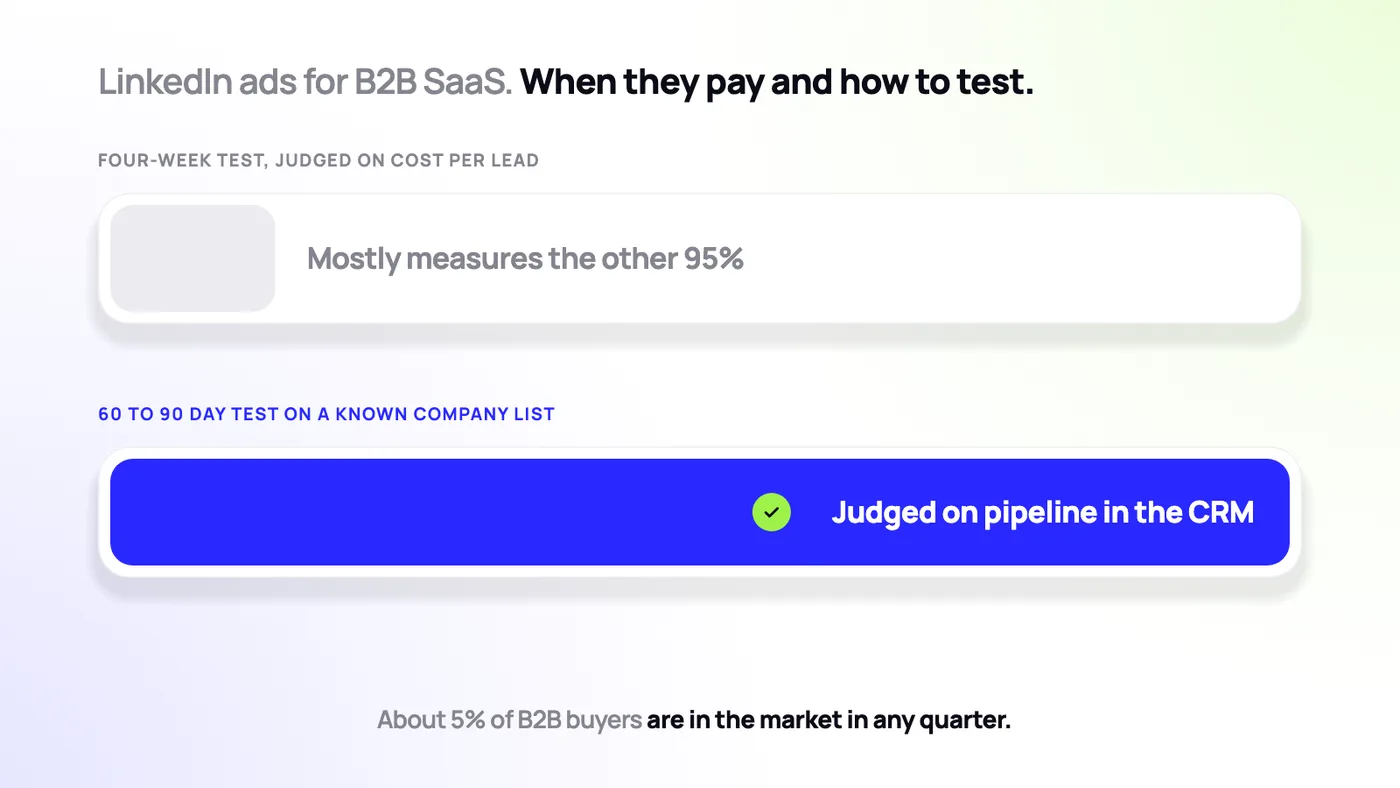
About 5% of B2B buyers are shopping in a given quarter, so give a first LinkedIn test 60 to 90 days to show pipeline.
You can't run a LinkedIn campaign below $10 a day, and on any given day spend can run up to 100% over that budget.
Thought Leader Ads only run on awareness and engagement objectives, so your first test captures leads through Lead Gen Forms or gated document ads.
Judge the test on opportunities and pipeline in your CRM, which LinkedIn's Revenue Attribution Report pulls from Salesforce, Dynamics 365 or HubSpot.
Only about 5% of B2B buyers are in the market for a typical business service in any quarter, by the arithmetic in a paper Professor John Dawes of the Ehrenberg-Bass Institute wrote for LinkedIn's B2B Institute. A four-week LinkedIn test judged on cost per lead mostly measures the other 95%.
For a seed to Series A SaaS, LinkedIn ads pay when you can name your buyer by company and role, and when your deal size can carry an auction-priced click. The version that pays is a 60 to 90 day test on a known company list, judged on pipeline in the CRM.
Do LinkedIn ads work for B2B SaaS?
LinkedIn ads are paid placements in the LinkedIn feed that you target by what members say about their own job and employer. They work best when your buyer sits at companies you could list by name.
LinkedIn's targeting reference covers both sides of that buyer:
- company name, industry and the estimated size of the organization
- job title and job function
- job seniority, the rank or influence of a member's current role
Matched Audiences come from your own data: an uploaded company or contact list, or the site visitors you retarget.
A company list can hold up to 300,000 companies, and it has to match at least 300 member accounts before it can run. LinkedIn's audience size guidance still suggests 50,000 members to drive results, so we'd build the list as wide as your real market allows.
You pay for that precision in the auction. We'd skip LinkedIn for a low-priced self-serve product that anyone with a card can buy, and for a buyer whose job title says nothing about whether they get to sign.
| Meta | ||
|---|---|---|
| Targeting basis | Employer, title and seniority from member profiles | Self-declared job titles, per the Meta targeting reference |
| Your own data | Company lists, contact lists and site visitors | Custom Audiences from customer information, per Meta's guide |
| Minimum daily budget | $10 per campaign | $1.00 per ad set on impressions in the US and UK, an example amount in Meta's campaign reference |
| Where it fits | A named buyer at named accounts | A buyer you can't pin to an employer |
Not sure your buyer and deal size fit the channel yet? Take the three-question diagnosis before you commit a budget.
Why do most B2B buyers ignore your ads this quarter?
Most companies replace a supplier such as their main bank or law firm about once every five years. In John Dawes's 95-5 paper for the LinkedIn B2B Institute, that cycle puts about 20% of business buyers in market over a year and about 5% in a quarter.
Dawes doesn't offer the 95% figure as a precise rule. Your category's share comes from the average time between purchases, and in the paper's own example a two-year cycle leaves about 13% in market in any quarter.
How long did your current customers keep the tool they had before yours? A few of them can tell you on a call, and their answer sets what a 90-day test can produce.
Say your list holds 2,000 target accounts. At 5% in market, about 100 of them are shopping this quarter while the other 1,900 are a year or more away.
So a first test has two halves. The memory half keeps you known to the accounts that will buy later, which is how the paper says a B2B brand grows. The capture half catches the few who are shopping now.
Timing the spend counts as much. A campaign can raise your share of the buyers in market today, but it can't bring in buyers who aren't there yet.
Spend the budget in one burst and you're off the air for the accounts that enter the market in month three, so we'd pace a smaller daily budget across the whole window. Early lead volume tells you little here, and we'd read engagement from accounts on your list first.
What does LinkedIn advertising cost to learn?
LinkedIn's floor is a $10 minimum daily budget per campaign, whatever the ad format. A new campaign on a lifetime budget needs at least $100, and after launch that minimum becomes $10 times the days scheduled.
The same page suggests $25 a day for new advertisers, and we'd treat that as the working floor per campaign.
Daily spend also moves around. LinkedIn's budget help page says actual spend can run up to 100% above the daily budget on a given day, so plan the test's spend by the week and the month.
You choose how the auction prices your reach, and LinkedIn's bidding strategies page lists the options:
| Bidding option | How it works | When we'd use it |
|---|---|---|
| Maximum delivery | Automated, charged per impression (CPM), with a learning phase | The memory half |
| Cost cap | Your cost per key result guides the automated bids | The capture half, once you know what a lead is worth |
| Manual bidding | Most control over the bid, possibly weaker delivery | A small list where price per impression matters |
The same page says there's no set cost per result, so your budget follows from the floor and the length of the window. Two campaigns at $25 a day for 90 days come to $4,500 of planned spend.
If that's more than you can spend, cut a campaign before you cut the daily budget. A campaign held under $25 a day teaches you very little, in our view.
Which LinkedIn ad formats should you test first?
Three formats cover both halves. Thought Leader Ads carry the memory half, while gated document ads and Lead Gen Forms carry the capture half.
Thought Leader Ads promote posts from LinkedIn members, and that member can be your own founder. The author has to give permission to sponsor the post, and the post has to be public. They run only on brand awareness and engagement objectives, plus video views for video.
Document ads let members read and download a document in the feed. With a Lead Gen Form attached the full document stays locked until the member fills out the form, and you choose how many preview pages they see first.
Lead Gen Forms prefill contact and profile details when a member clicks the ad's call to action. The leads can sync straight to your CRM or marketing automation platform, which is where you read the capture half at day 90.
| Format | Role in the test | What to measure |
|---|---|---|
| Thought Leader Ads | Memory with accounts out of market | Engagement from accounts on your list |
| Document ad with a Lead Gen Form | Capture behind a gate | Form fills, then opportunities |
| Lead Gen Form on a demo offer | Capture from accounts shopping now | Synced leads, then opportunities |
We'd start with the founder. For a seed to Series A team we'd run the founder's Thought Leader Ads plus one gated document ad cut from the sales deck, and we'd hold the demo form until the list has seen the founder for a month.
How we run a first LinkedIn test when we hold the seat
When we take the growth seat, we fix the CRM before we touch the campaigns. We check that LinkedIn leads land with a source and that every deal shows its account, because the day 90 read depends on both. Then we build the account list with your sales team and pick the two formats that fit the deal size and the founder's time.
Paid Media is our sharpest tool, and Conversion and Funnel covers what happens after the click. From the first call to taking the seat is usually 1 to 2 weeks, and the audit comes first. You'll find all five lines in what we own.
Tell us where growth stands and we'll start by checking your CRM sources and building the account list.
How do you structure a first 60 to 90 day test?
LinkedIn's own buyer groups best practices set the window. They say to judge engagement quality over 30 to 60 days, then pipeline after at least 60 days or one full sales cycle.
The same page suggests combining (AND) your company list with a buyer group product category, which uses LinkedIn's AI models to find the people who decide on a purchase together.
| Phase | Days | What happens |
|---|---|---|
| Setup | Before day 1 | Tracking live, UTMs into the CRM, company list combined with a buyer group |
| Run | Day 1 to 90 | Two formats on one audience, each campaign at $25 a day or more, paced evenly |
| Read | Day 30 to 90 | Engagement from list accounts first, then their opportunities and pipeline |
Four setup details decide whether you can trust the read:
- Run the Conversions API next to the Insight Tag. LinkedIn's Conversions API page rates the server connection as more reliable than the cookie-based tag and counts an event sent through both only once.
- Use the Insight Tag for website retargeting, which matches site visitors to member accounts.
- Switch off LinkedIn Audience Network, which is on by default for new ad sets in the formats this test uses.
- Switch off audience expansion as well, since both defaults move budget away from the company list you mean to measure.
Scale a campaign at day 90 if its list accounts opened opportunities, and stop one whose accounts engaged without opening any. If nothing opened at all, fix the offer before you spend again.
It's the same order we follow in how we work: the audit, then the system, then execution.
What should you measure beyond cost per lead?
Opportunities and pipeline in the CRM decide the test. LinkedIn's Revenue Attribution Report can read both from a connected Salesforce, Dynamics 365 or HubSpot account.
The report shows pipeline amount and revenue won, and it counts the open and closed-won opportunities driven by LinkedIn. You also set how many touch points inside the lookback window count as LinkedIn influence.
Pick that rule before the test starts, since a rule chosen at day 90 tends to be the one that flatters the channel.
Without attribution every budget call is a guess. That is the first thing we fix.
For accounts, Companies in Campaign Manager shows engagement, impressions and leads for each target company. Cost per lead stays in the report as one input. On its own it can't tell you whether a lead came from an account on your list or one off it.
At day 90, report five numbers:
Paid works while you pay. Without a funnel behind it, CAC only goes one way.
What to do next
Run the test if three things hold:
If your CRM can't show pipeline by source yet, fix attribution and the funnel first. A test you can't read at day 90 only buys impressions.
We work in monthly partnerships with a short initial commitment, and we say upfront when the numbers don't show a clean path to profit.
Take the three-question diagnosis to see whether LinkedIn belongs in your plan this quarter, or email hello@frctnl.agency to request a slot.
Written byLuka
Want this applied to your pipeline?
No obligation. Start the conversation.